Skip to content

04/2026

MCP Client/Server architecture

Developing tools that LLM agents can use is time-consuming and inconsistencies in implementation make them difficult to reuse. Anthropic introduced MCP to bring a transformation to the LLM tool integration. MCP establishes a common language for LLM agents to communicate with tools.

MCP consists of three component architecture: Host, Client and Server.

The Host is the application that interacts with users and make decisions using a LLM. It receives user input, performs reasoning, and decides which tools touse and when. Think of it as the "brain" of the system.

The MCP client acts as a bridge between the Host and MCP servers. When the Host decides it needs a tool, the client handles the communication, requesting available tool definitions from servers and forwarding tool execution requests. Each client maintain one connection to the MCP server.

The MCP server hosts the actual tools and executes them on demand. It responds what type of tools you have and execute this tool with these arguments. Servers can connects to the external resources such as databases and APIs.

flowchart TD
    Host["Host Process<br/>Orchestrates"]:::host

    Host -->|Creates and manages| C1
    Host -->|Creates and manages| C2
    Host -->|Creates and manages| C3

    subgraph clients["Client Instances"]
        direction LR
        C1["Client 1"]
        C2["Client 2"]
        C3["Client 3"]
    end

    C1 -->|1:1| S1
    C2 -->|1:1| S2
    C3 -->|1:1| S3

    subgraph servers["MCP Servers"]
        direction LR
        S1["File Server<br/>Resources: Files"]
        S2["Database Server<br/>Tools: Queries"]
        S3["API Server<br/>Prompts: Templates"]
    end

    classDef host fill:#3FB1F2,stroke:#2A9BD8,color:#fff

Transport Mechanism

MCP supports three transport mechanism for communication between clients and servers.

  • stdio (Standard I/O) is the simplest approach. The client launches the server as a subprocesses and communicates through the standard input/output streams. Since everything runs locally on the same machine, there is no network overhead. This is ideal for local development.

  • Streamable HTTP enables communicates over the network. The client sends the requests via HTTP and server streams responses back.

  • Websocket provides full bidirectional communication allowing both client and server to initiate messages. This is useful when servers need to push updates to clients proactively.

Standardized Interfaces

MCP standardized two key interfaces Tool Discovery and Tool Execution

  • Tool Discovery: The client request available tool definitions, and the server returns them in a standardized format. The tool developers implement the schema once and any MCP compatible client can automatically retrieve and use it
  • Tool Execution: The client sends a tool execution to the server which handles execution and returns the result in a consistent format.

MCP Primitives

  • Tools are server exposed functions that clients invoke. Server define a tool with name, description and input schema. Example, read_file, query_database, fetch_api
  • Resources are data sources or URIs. Server exposes file:// or custom:// URIs. It is static or dynamic.
  • Prompts are reusable templates for LLM interactions. Servers define prompt templates with arguments. Client call get prompt function with arguments.

AI Agent - Running and Connecting the MCP server

MCP servers in the ecosystems are distributed as npm packages and run using npx. You can verify the node installation by checking the version. If it displays then the installation is successful.

node --version

Running Tavily MCP server

Tavily MCP server provides the web search capability packaged as a ready to use MCP server. You can launch the Tavily MCP server using single command. Register the Tavily key in the environment variable.

export TAVILY_API_KEY=<key>

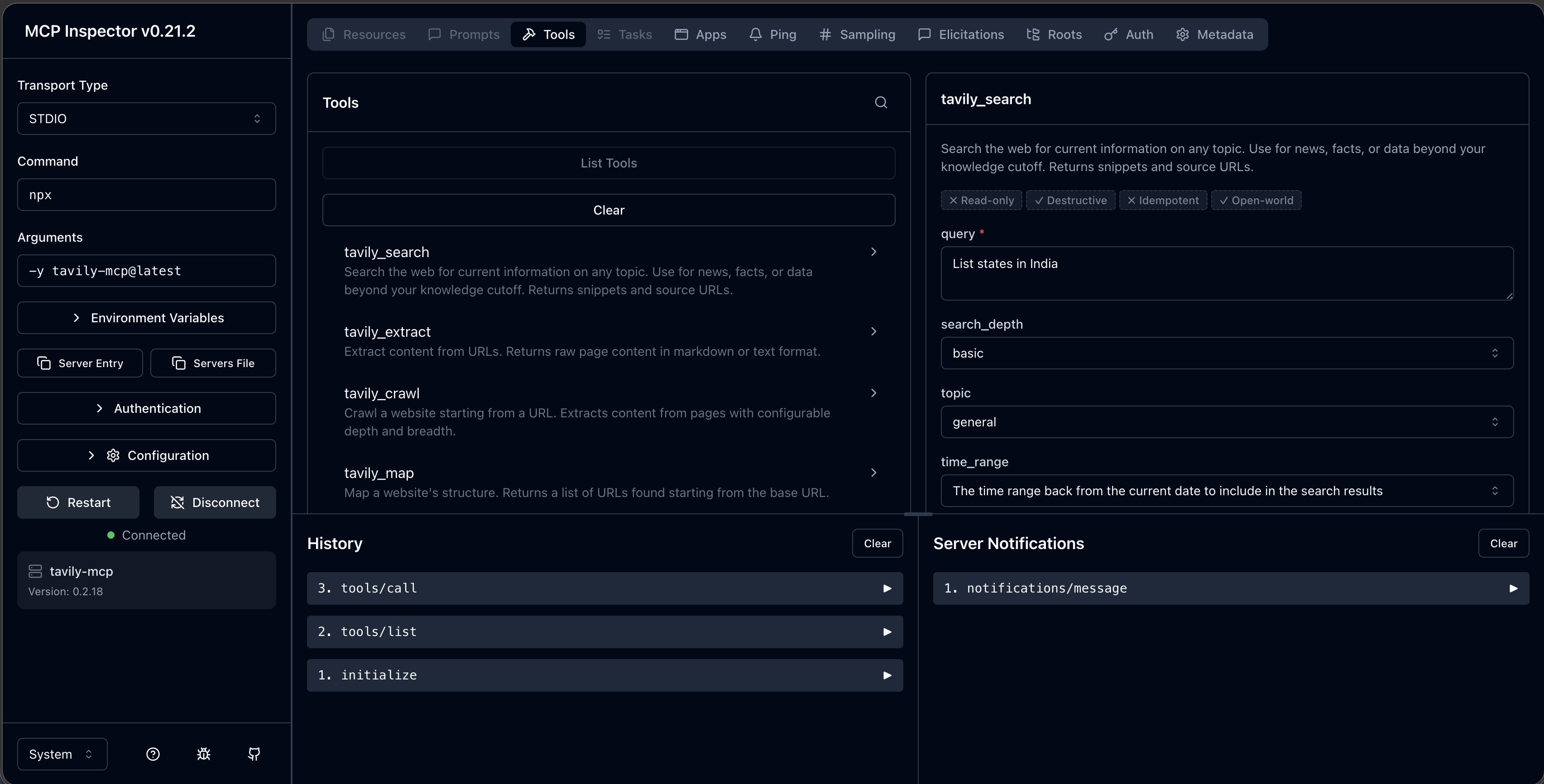
Launch the server with MCP inspector. It is a browser based tool for testing the MCP servers. Run the below command and it launches the browser based tool http://localhost:6274/...

npx @modelcontextprotocol/inspector npx -y tavily-mcp@latest

You will see several tabs Resources, Prompts and Tools. These reflect the capabilities exposed by the MCP server. Select the Tools tab and click List Tools. It will displays list of tools provided by the Tavily MCP server.

MCP Inspector

AI Agent - Tool Calling or Function Calling

LLM interact with external tools through the structured tool calling or function calling. It is a key components, how agents make decisions using tools and memory, and how structured tool invocation enables dynamic, real-time interactions with the external world to solve complex tasks.

Tools are essentially function made available to LLM's. LLMs do not execute tools or functions directly. Instead, they generate a structured representation indicating which tool to use and with what parameters.

When you pose a question to the LLM that requires external information or computation, the model evaluates the available tools based on their names and descriptions. If it identifies a relevant tool, the model generates a structured output (typically formatted as a JSON object) that specifies the tool's name and appropriate parameter values. This is still text generation, just in a structured format intended for tool input.

An external system then interprets this structured output, executes the actual function or API call, and retrieves the result. This result is subsequently fed back to the LLM, which uses it to generate a comprehensive response.

Workflow

  • Define a weather tool and ask question like "What's the weather like in TX?"
  • The model halts regular text generation and outputs a structured tool call with parameter values (e.g., "location": "TX").
  • Extract the tool input, execute the actual weather function, and obtain the weather details.
  • Pass the output back to the model so it can generate a complete final answer using the real-time data.

Function calling and Tool calling both are same capability by enabling an LLM to request specific external functions to be executed with structured parameters. Function calling term coined by OpenAI in their documentation.

Key principles keep in mind when developing tool calling:

  • Clear purpose - make sure tool has well defined task
  • Standardized input - The tool shoud accept input in a predictable, structured format.
  • Consistent output - The format which is easy to process and integrate with other system
  • Comprehensive Documentation - explain what the tool does, how to use it and any limitations
  • Limit the number of functions - keep the number of tools under 20. Using too many tools can lead to selection errors.

To enable tool calling,

Specify Tool Definitions

The function has 3 essencial components

  • name
  • description
  • parameters
calc_tool_def = {
    "type": "function",
    "function": {
        "name": "calc",
        "description": "Perform a calculation based on the provided expression.",
        "parameters": {
            "type": "object",
            "properties": {
                "operator": {
                    "type": "string",
                    "description": "Arithmetic operation to perform",
                    "enum": ["add", "subtract", "multiply", "divide"],      
                },
                "operand1": {
                    "type": "number",
                    "description": "The first number in the calculation",
                },
                "operand2": {
                    "type": "number",
                    "description": "The second number in the calculation",
                },
            },
            "required": ["operator", "operand1", "operand2"],
        }
    }
}

Setup the tool

def calculator(operator: str, operand1: float, operand2: float):
   if operator == 'add':
       return operand1 + operand2
   elif operator == 'subtract':
       return operand1 - operand2       
   elif operator == 'multiply':
       return operand1 * operand2
   elif operator == 'divide':
       if operand2 == 0:
           raise ValueError("Cannot divide by zero")
       return operand1 / operand2
   else:
       raise ValueError(f"Unsupported operator: {operator}")

Executing the tool calling

from litellm import completion

tools = [calc_tool_def]

print("Without Tools:")
without_tools = "How many days in a week?"
response_without_tool = completion(
        model='claude-sonnet-4-20250514',
        messages=[{"role": "user", "content": without_tools}],
        tools=tools
)
print(response_without_tool.choices[0].message.content) 
# There are 7 days in a week....
print(response_without_tool.choices[0].message.tool_calls)
# None

print("With Tools:")
with_tools = "What is the result of calculating 10 divided by 2 using the calculator tool?"
response_with_tool = completion(
        model='claude-sonnet-4-20250514',
        messages=[{"role": "user", "content": with_tools}],
        tools=tools
)
print(response_with_tool.choices[0].message.content)
# I'll use the calculator tool to divide 10 by 2 for you.
print(response_with_tool.choices[0].message.tool_calls)
# [ChatCompletionMessageToolCall(
#     index=1,
#     caller={'type': 'direct'},
#     function=Function(
#         arguments='{"operator": "divide", "operand1": 10, "operand2": 2}',
#         name='calc'
#     ),
#     id='toolu_01XXWamC3kDafkNYbBv2EXic',
#     type='function'
# )]

Feedback the result to the LLM

ai_message = response_with_tool.choices[0].message

messages = []

messages.append({  
   "role": "assistant",  
   "content": ai_message.content,  
   "tool_calls": ai_message.tool_calls  
})

if ai_message.tool_calls:
   for tool_call in ai_message.tool_calls:
       function_name = tool_call.function.name  
       function_args = json.loads(tool_call.function.arguments)  

       if function_name == "calc":
           result = calculator(**function_args)  

           messages.append({  
               "role": "tool",  
               "tool_call_id": tool_call.id,  
               "content": str(result)  
           })

final_response = completion(
   model='claude-sonnet-4-20250514',
   messages=messages,
   tools=tools
)
print("Messages: ", messages)
# Messages: [
#     {
#         'role': 'assistant',
#         'content': "I'll use the calculator tool to divide 10 by 2 for you.",
#         'tool_calls': [
#             ChatCompletionMessageToolCall(
#                 index=1,
#                 caller={'type': 'direct'},
#                 function=Function(
#                     arguments='{"operator": "divide", "operand1": 10, "operand2": 2}',
#                     name='calc'
#                 ),
#                 id='toolu_01XXWamC3kDafkNYbBv2EXic',
#                 type='function'
#             )
#         ]
#     },
#     {
#         'role': 'tool',
#         'tool_call_id': 'toolu_01XXWamC3kDafkNYbBv2EXic',
#         'content': '5.0'
#     }
# ]

print("Final Answer:", final_response.choices[0].message.content)
#Final Answer: 10 divided by 2 equals 5.

Summary

Tool calling enables LLMs to go beyond static text generation by:

  • Accessing real-time data
  • Performing computations
  • Integrating with external systems

It is a foundational capability for building intelligent, autonomous AI agents.

AI Agent - Prompt Engineering

Prompt engineering is the practice of instructing a large language model (LLM) to behave effectively as an agent. A prompt provides the guidance the model needs to produce accurate, relevant, and consistent outputs.

Prompts generally fall into two categories:

  • User prompts: Inputs provided by the user through a chat interface. These vary with each interaction.
  • System prompts: Developer-defined instructions that persist throughout the conversation. They establish the agent’s personality, constraints, permissions, and tool usage policies.

A well-crafted system prompt transforms a general-purpose LLM into a reliable, task-specific agent. While user prompts are unpredictable and driven by user behavior, system prompts provide consistency and control over how the agent responds.

Structure of System Prompts

A system prompt serves four primary roles:

  1. Define product identity
  2. Specify output format and style
  3. Set boundaries and prohibited behaviors
  4. Clarify the limits of knowledge

The most important role is defining who the agent is. This helps the model communicate its purpose and capabilities clearly, while avoiding outdated or inaccurate self-descriptions. An effective agent must understand its role to explain what it can and cannot do.

System prompts can also enforce response format and style. This is especially useful when outputs are consumed programmatically. However, overly rigid formatting may feel unnatural in conversational contexts.

Additionally, system prompts should include clear refusal guidelines. These define which requests the agent must decline. Boundary setting is critical because autonomous agents may otherwise behave unpredictably without explicit constraints.

Finally, agents must recognize their limitations. When a request exceeds those limits, they should either use appropriate tools or respond transparently about their constraints.

Best Practices for Agent Prompts

  • Enable autonomous behavior while maintaining control through clear instructions
  • Use tools strategically when tasks require external capabilities
  • Treat tool definitions as part of the prompt, ensuring the model understands how and when to use them

LLM Asynchronous Calls: Speeding Up Your AI Agents

When developing an agent, you often need to process multiple LLM requests simultaneously. This includes evaluating benchmark results, comparing responses from multiple models, and running multiple agents concurrently in a multi-agent system.

If you send requests sequentially, the total execution time is equal to the sum of each request’s duration. With asynchronous execution, multiple requests run in parallel, allowing each request to complete as soon as its response is ready.

Python supports asynchronous programming using the async/await syntax and the asyncio package. LiteLLM supports asynchronous operations through the acompletion API. The await keyword pauses execution of a task until the result is available, while still allowing other tasks to run in the meantime. The asyncio.gather function executes multiple tasks concurrently and returns all results together.

import asyncio
from litellm import acompletion 

async def get_response(prompt: str) -> str:

    # LiteLLM supports async operations
    response = await acompletion(
        model="gpt-5-mini",
        messages=[
            {"role": "user", "content": prompt}
        ],
        num_retries=3,  # Retry up to 3 times on failure
        retry_delay=2   # Wait 2 seconds between retries
    )
    return response.choices[0].message.content

prompts = [
    "What is the capital of India?",
    "What is the largest mammal?",
    "Who wrote 'Harry Potter'?"
]

tasks = [get_response(prompt) for prompt in prompts]

# Execute tasks concurrently
results = await asyncio.gather(*tasks)

for prompt, result in zip(prompts, results):
    print(f"Q: {prompt}\nA: {result}\n")

There are two common issues when sending multiple requests together: rate limiting from the LLM API provider and network instability or server overload. LiteLLM addresses these challenges with the num_retries parameter, which handles transient failures using automatic retries (with exponential backoff).

To control rate limiting, you can use the asyncio.Semaphore API to limit how many requests run concurrently.

In summary, asynchronous execution is a key feature for improving the performance and efficiency of AI agents that interact with LLMs.

LLM Structured Output

Natural language generated by LLMs is excellent for humans but inconvenient for programs to process. For an agent to call tools, it must output which tool to call along with the required arguments in a structured format. The structured output feature enables the LLM to generate responses in a well-defined JSON format.

You can define the desired format using the Python Pydantic library. It is used for data validation and for defining data structures and classes. You create a schema with field names, and the class must inherit from the Pydantic BaseModel class. Pydantic then automatically validates any data against this schema, raising clear errors if the data does not match. This helps enforce data validation and catch malformed inputs.

Install Pydantic Package

uv add pydantic
uv add 'pydantic[email]'

Define schema and fields

1
2
3
4
5
6
from pydantic import BaseModel, EmailStr

class PersonalInfo(BaseModel):
    name: str
    email: Emailstr
    phone: str | None = None

Invoke the LLM to get the structured output

response = completion(
    model="gpt-5-mini",
    messages=[{
        "role": "user", 
        "content": "My name is James, my email is james@example.com, and my phone is 555-123-1234."
    }],
    response_format=PersonalInfo
)

result = response.choices[0].message.content

LLM Stateless API Conversation Mangement

LLM APIs are stateless and each API call is independent and has no memory of previous call. The developer must manage the conversation history manually to maintain the continuity of the conversation.

We accumulate the conversation history in the messages list and pass the entire history with each API call. User messages are added into user role and model responses with the assistant role. This allows the model to understand the previous context and maintain the conversation.

This approach is very important for agent development. Agents needs to add all the conversation history and tool call results, search results and any reasoning steps to the context. As conversation history grows longer, token usages increases, raise the costs and slowing the response time. We must have efficient approach to compress volume of context history.

Example to shows the stateless API call

from litellm import completion

response = completion(
    model="gpt-5-mini",
    messages=[
        {"role": "system", "content": "You are a helpful assistant."},
        {"role": "user", "content": "My name is Yuvaraj."}
    ]
)
print(response.choices[0].message.content)

response2 = completion(
    model="gpt-5-mini",
    messages=[{"role": "user", "content": "What is my name?"}]
)
print(response2.choices[0].message.content)

#output - response
#Nice to meet you, Yuvaraj. How would you like me to address you (Yuvaraj, Mr. [Surname], or something else)? What can I help you with today?

#output - response2
#I don't know your name — I don't have access to personal data unless you tell me. 

Example of API maintain conversation context.

from litellm import completion

messages = []

# First call
messages.append({"role": "user", "content": "My name is Yuvaraj"})
response1 = completion(model="gpt-5-mini", messages=messages)
assistant_message1 = response1.choices[0].message.content
messages.append({"role": "assistant", "content": assistant_message1})
print(assistant_message1)

# Second API - includes previous conversation history
messages.append({"role": "user", "content": "What is my name?"})
response2 = completion(model="gpt-5-mini", messages=messages)
assistant_message2 = response2.choices[0].message.content
print(assistant_message2)

#output
#Nice to meet you, Yuvaraj. How can I help you today?
#Your name is Yuvaraj.

LLM API for building AI Agents

I set up a development environment to learn how to use provider APIs to call their LLM models. I use the OpenAI API to call the GPT-5 model and the Anthropic API to call the Claude Sonnet model.

I use the Python uv package manager to install the OpenAI and Anthropic API libraries. I also use the python-dotenv package to load provider token information from environment variables.

1
2
3
uv add openai
uv add anthropic
uv add python-dotenv

Configure and add the following provider's LLM access token:

1
2
3
#.env
OPENAI_API_KEY=<token>
ANTHROPIC_API_KEY=<token>

OpenAI

OpenAI’s Chat Completions API has become an industry standard, and most LLM providers offer similar interfaces. Let’s initialize the OpenAI client and send a simple request.

from openai import OpenAI

client = OpenAI() 

response = client.chat.completions.create(
    model="gpt-5-mini",
    messages=[
        {"role": "system", "content": "You are a helpful assistant."},
        {"role": "user", "content": "What is the capital of France?"}
    ]
)

print(response.choices[0].message.content)

Anthropic

Anthropic works in a similar way, but there are some differences in how the API is called. OpenAI uses client.chat.completions.create, whereas Anthropic uses client.messages.create. Likewise, the response formats differ: OpenAI returns content in choices[0].message.content, while Anthropic returns it in content[0].text.

import anthropic

client = anthropic.Anthropic()

message = client.messages.create(
    model="claude-sonnet-4-20250514",
    max_tokens=1024,
    system="You are a helpful assistant.",
    messages=[
        {"role": "user", "content": "What is an AI agent? Answer in one sentence."}
    ]
)

print(message.content[0].text)

LiteLLM

Switching between different LLM providers when building AI agents can be tedious. Each provider offers different interfaces, which can impact both cost and performance requirements. LiteLLM solves this problem by providing a unified approach. It is an open-source library that offers a single interface to call over 100 LLMs.

LiteLLM’s main features include:

  • Calling any provider using the same completion() interface
  • A consistent output format, regardless of the provider or model used
  • Built-in retry and fallback logic across multiple deployments via the Router
  • Compatible exception handling across all providers
  • Support for observability

Install LiteLLM

uv add litellm

Accessing the LiteLLM API

from litellm import completion

response = completion(
    model="gpt-5-mini",
    messages=[
        {"role": "system", "content": "You are a helpful assistant."},
        {"role": "user", "content": "My name is Yuvaraj."}
    ]
)
print(response.choices[0].message.content)

response2 = completion(
    model="gpt-5-mini",
    messages=[{"role": "user", "content": "What is my name?"}]
)
print(response2.choices[0].message.content)

AI System Design

AI System design consists of three paradigms

  1. Single LLM feature
  2. Structure Workflow
  3. Autonomous Agents

Single LLM

Single LLM is a simple and perform single one shot task. It is stateless processing. No retention of information or context across interactions. It is straight forward request/response mechanism and suitable only for clearly defined, single step actions.

It is best usecase for simple well defined tasks that require no memory or multi-step logic. The main advantage is simple, speed, deterministic output and low cost

Example:

  • Text summarization
  • Sentiment classification
  • Informaiton extraction
  • Translation

Single LLM

Structured Workflow

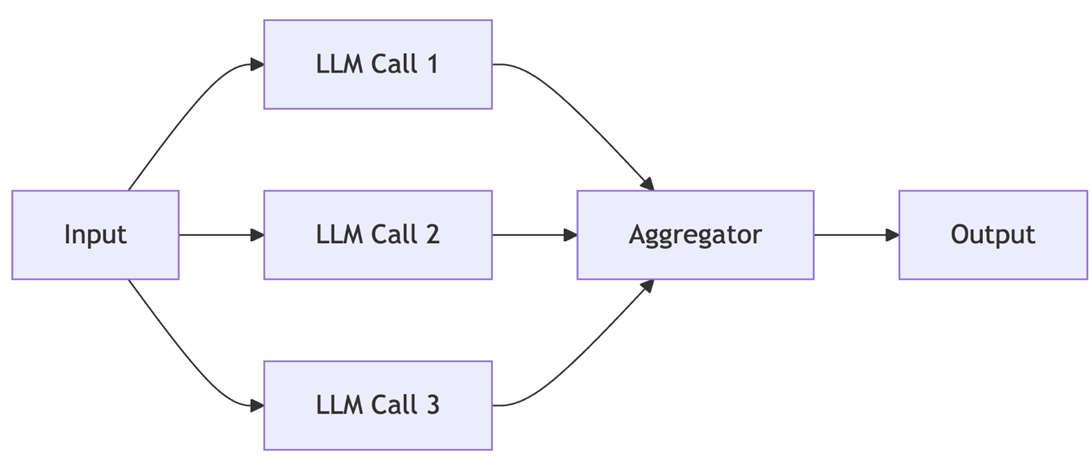
Structured workflows orchestrate LLM and tool calls through explicit, deterministic code paths. They're ideal for repetitive, multi-step, or compliance-heavy tasks.

Consider processing insurance claims, where each document is scanned, information is extracted, validated, and stored. Each step must follow a precise, predictable order, making structured workflows ideal.

Best uses for repetitive, multi-step tasks with clear logic and minimal ambiguity, regulatory or compliance-driven applications. The limitation is to difficult to adapting to new scenarios and development overhead.

Example:

  • Document and data pipelines (Optical Character Recognition (OCR) → extraction → validation → storage)
  • Batch report generation
  • Financial and healthcare transaction processing

Workflow LLM

Autonomous Agents

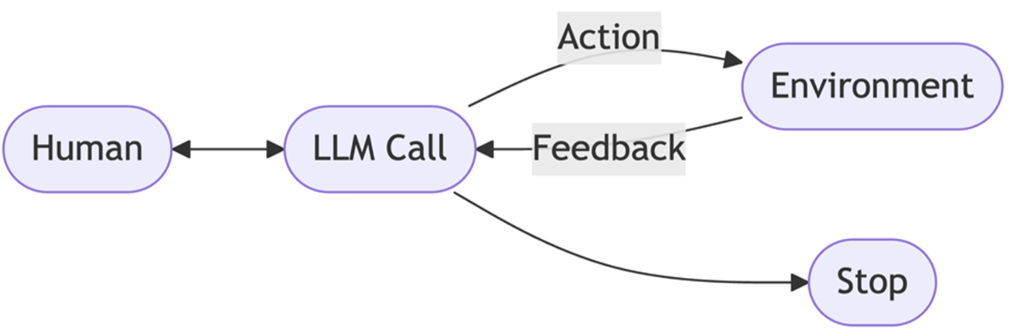
Autonomous Agents are flexible, context-aware reasoning. It allow LLMs to plan sequence actions and adapt as conditions change. Agents choose which tools to use and how to achieve their goals based on real-time context and feedback.

It is best use for complex, open-ended tasks with unclear solution paths, scenarios requiring real-time adaptation and reasoning, environments with high variability or need for personalization

The advantage is highly adaptable, dynamic decision making, reduces human intervention. The limitations are unpredictable outcomes, higher complexity cost.

Example:

  • Research Agent
  • Customer support and troubleshooting
  • Automation

Autonomous Agent

AI System type Process Use Case Pros Cons
Single LLM Input → LLM → Output Summarization, classification Simple, fast, low cost Not adaptable, lacks context
Workflow Parallel LLMs → Aggregation → Output Structured multi-step tasks Predictable, easy to audit Rigid, not dynamic
Agent Plan → Act → Observe → (repeat agent loop) Complex, adaptive automation Flexible, learns from feedback Unpredictable, complex, costlier